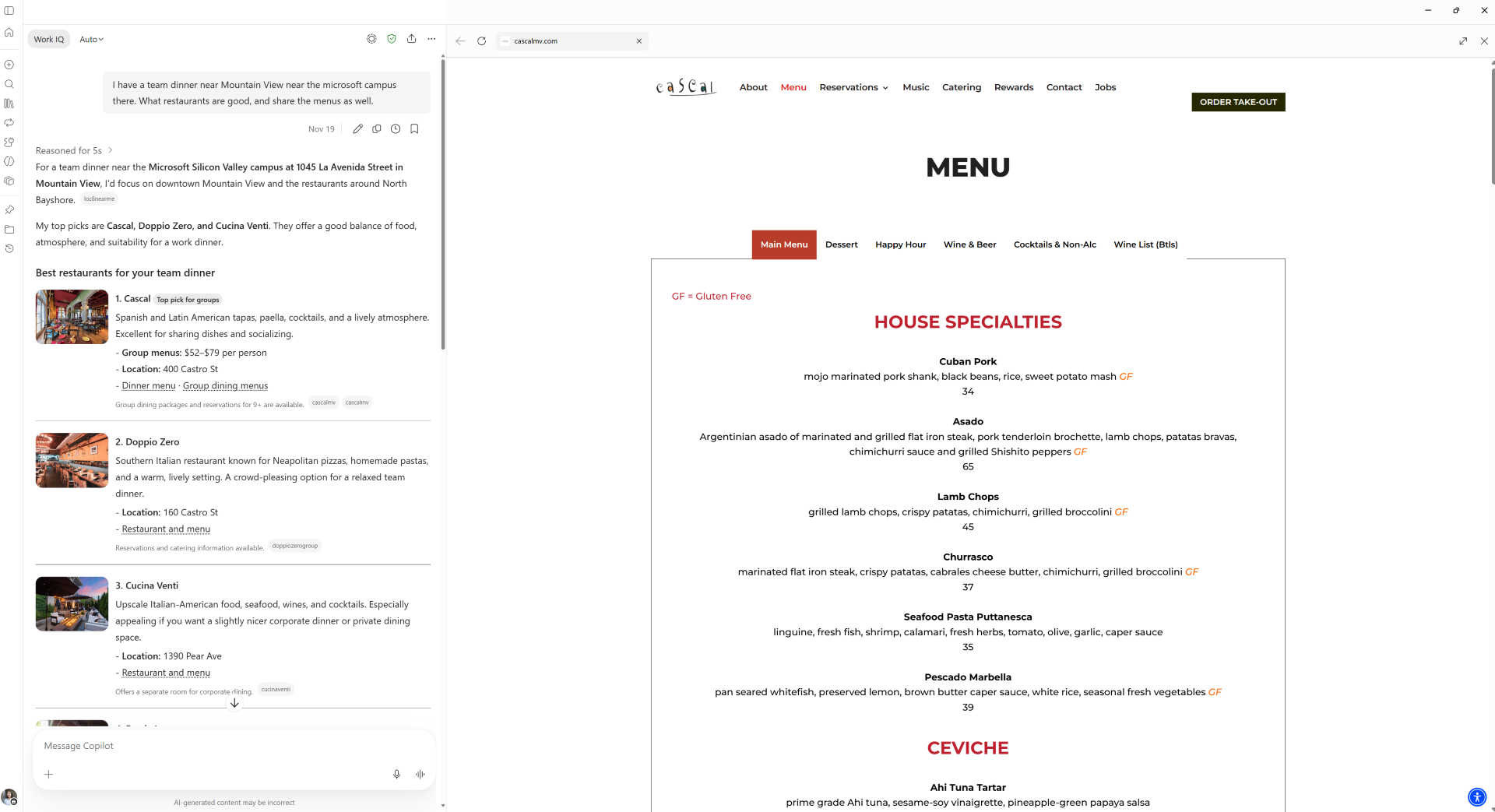
MC1560922: Microsoft Copilot: In-app browsing will be enabled by default in the desktop app

Published . Last updated .

Microsoft 365 Message Center announcement MC1560922.

MS Message Center's Summary

Microsoft is enabling in app browsing by default for the Copilot desktop app on Windows and Mac starting in January 2027. This change allows users to view shared websites side by side with their Copilot conversations. Administrators should evaluate security and compliance policies to determine whether to keep this default setting or deploy device management controls to disable the feature before rollout completion.

Administrator impact
Review device management policies to decide if in app browsing should be disabled using the BrowsingEnabled policy.
End user impact
Websites shared in Copilot chat will open directly inside the desktop app.
Importance
4/10: The update introduces a user interface change affecting web content handling within the desktop application.

Microsoft Summary

Microsoft Copilot desktop app will enable in-app browsing by default starting January 2027, allowing users to open websites shared in chat within the app alongside conversations. No action is needed unless organizations want to disable or manage this feature via policies.

Message Center ID
MC1560922
Category
plan For Change
Severity
normal
Services
Microsoft Copilot (Microsoft 365)
Tags
Feature update, User impact, Admin impact
Expires
Action required by

What and why

We are enabling in-app browsing by default in the Microsoft Copilot desktop app for Windows and Mac. As we announced in MC1474455, this feature allows users to open websites shared in Copilot chat directly within the desktop app, side by side with their Copilot conversation. Previously optional, this experience will be enabled by default, helping users access web content and Copilot responses in one place and reduce context switching.

Rollout schedule

  • General Availability (Worldwide): Rollout will begin in early January 2027 and is expected to complete by the end of January 2027.

Impact on your organization

Who is affected

  • Users of the Microsoft Copilot desktop app for Windows and Mac.

Platforms and services

  • Microsoft Copilot desktop app for Windows and Mac

What will happen

  • Websites shared in Copilot chat will open directly within the desktop app by default, side by side with the Copilot conversation.
  • Users can view web content and Copilot responses in one place, reducing context switching.

updated Copilot in-app browsing experience

Action required and recommendations

No action is required to enable in-app browsing. If your organization wants to disable or manage this experience:

  • Set the BrowsingEnabled policy to Off through your device management system to disable in-app browsing.
  • Configure the new in-app browsing policies as needed to manage security, privacy, access, authentication and network behavior, downloads, and permissions.

If no changes are made, in-app browsing will remain enabled by default.

Learn more

We will update this message with updated documentation.

Compliance considerations

No compliance considerations identified. Review as appropriate for your organization.