Microsoft 365 Message Center announcement MC1557754.
What and Why
We’re introducing the option to continue using models in Copilot Chat and Office through usage-based billing (UBB) after reaching the usage limits included in a Microsoft 365 Copilot license. After reaching a limit, users can continue with Auto without consuming Copilot Credits or, if they have UBB enabled, can continue with the selected model by consuming Copilot Credits. New credit indicators in the UI help users understand when their work consumes Copilot Credits, while spending policies give administrators control over access and spending.
This capability was originally announced in MC1479276 and is rolling out alongside the models available only through usage-based billing announced in MC1519122.
Additionally, models offered in Chat and Word, Excel, and PowerPoint will now be visible in the model picker. Models that a user does not have access to will be greyed out and users will not be able to select them.
Rollout Schedule
- Frontier: Rolling out now.
- General availability: Planned for early December 2026 in the Worldwide production cloud.
Impact on Your Organization
Who is affected: End users with a Microsoft 365 Copilot license. To use models with usage-based billing in Chat and Word, Excel and PowerPoint, users must also have access to available Copilot Credits through an applicable spending policy that includes the Models with usage-based billing in Chat and Office service.
Platforms/Services: Copilot Chat in the Microsoft Copilot app and Copilot in Word, Excel, and PowerPoint across web, desktop, and mobile.
What will happen:
- When users reach an applicable model usage limit included in their license, they can continue with Auto without consuming Copilot Credits. Users that have UBB enabled can instead continue with the selected model using Copilot Credits.
- The new Models with usage-based billing in Chat and Office service will be available in spending policies.
- Access to models with usage-based billing requires the service to be included in an applicable spending policy, with credits available. Users without this access cannot use models with usage-based billing.
- Existing spending policies with Auto-apply new services enabled automatically include newly supported services as they become available. Policies with this setting disabled require administrators to add the service.
- A new credits icon helps users understand credit availability and whether their current experience consumes credits:
- A filled icon indicates that usage is metered and consumes Copilot Credits.
- An unfilled icon indicates that usage is not metered and does not consume Copilot Credits.
- Hovering over the icon shows credit usage details and an option to open a pane with additional information.
- Users can type and submit /cost as a prompt in Copilot to view details about their current session.
- Users will see models offered in Chat and Word, Excel, and PowerPoint visible in the model picker. If the user does not have access to a model, it will be greyed out, and the user will not be able to select it.
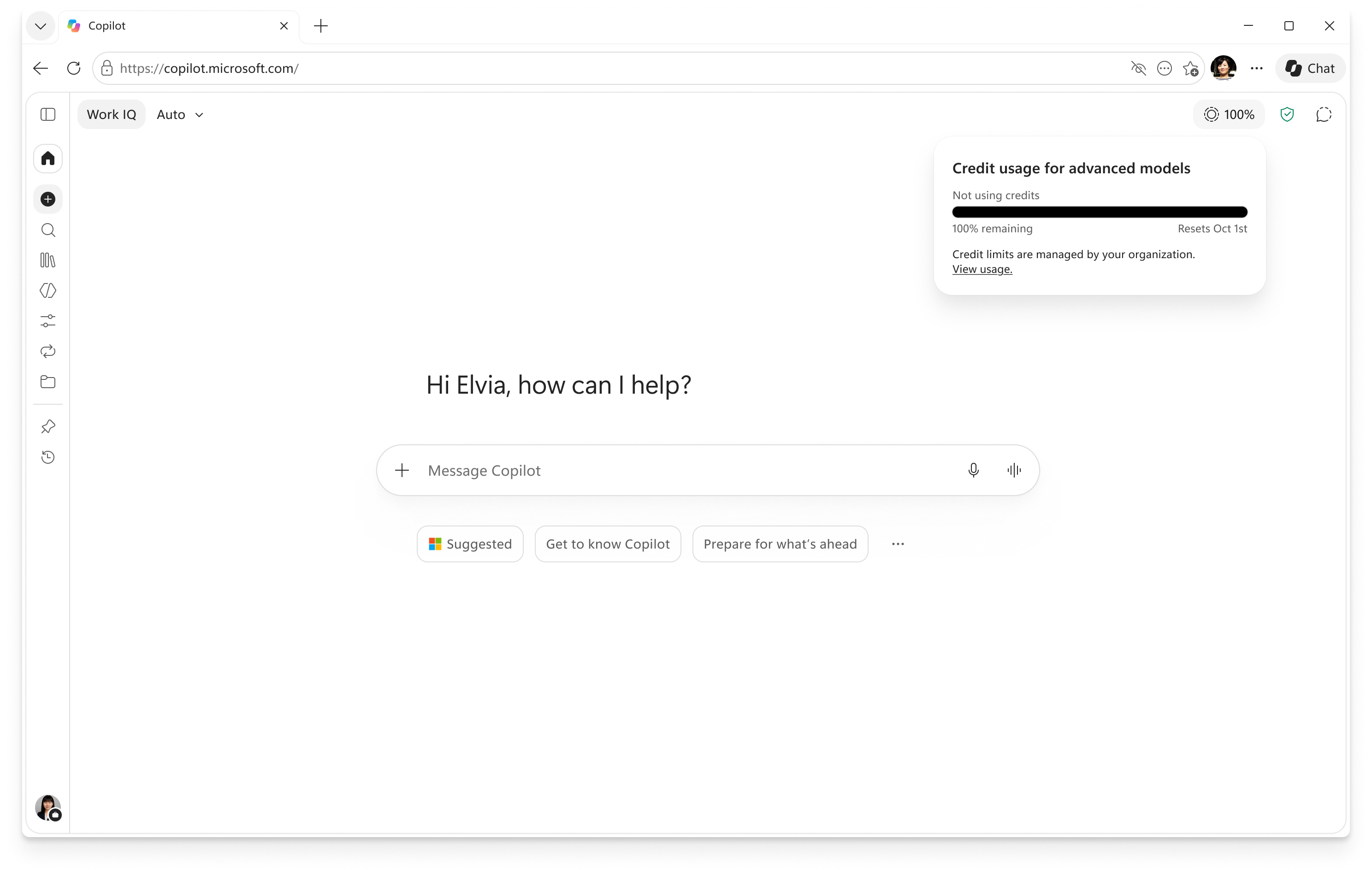
Image of credit icon and usage details.
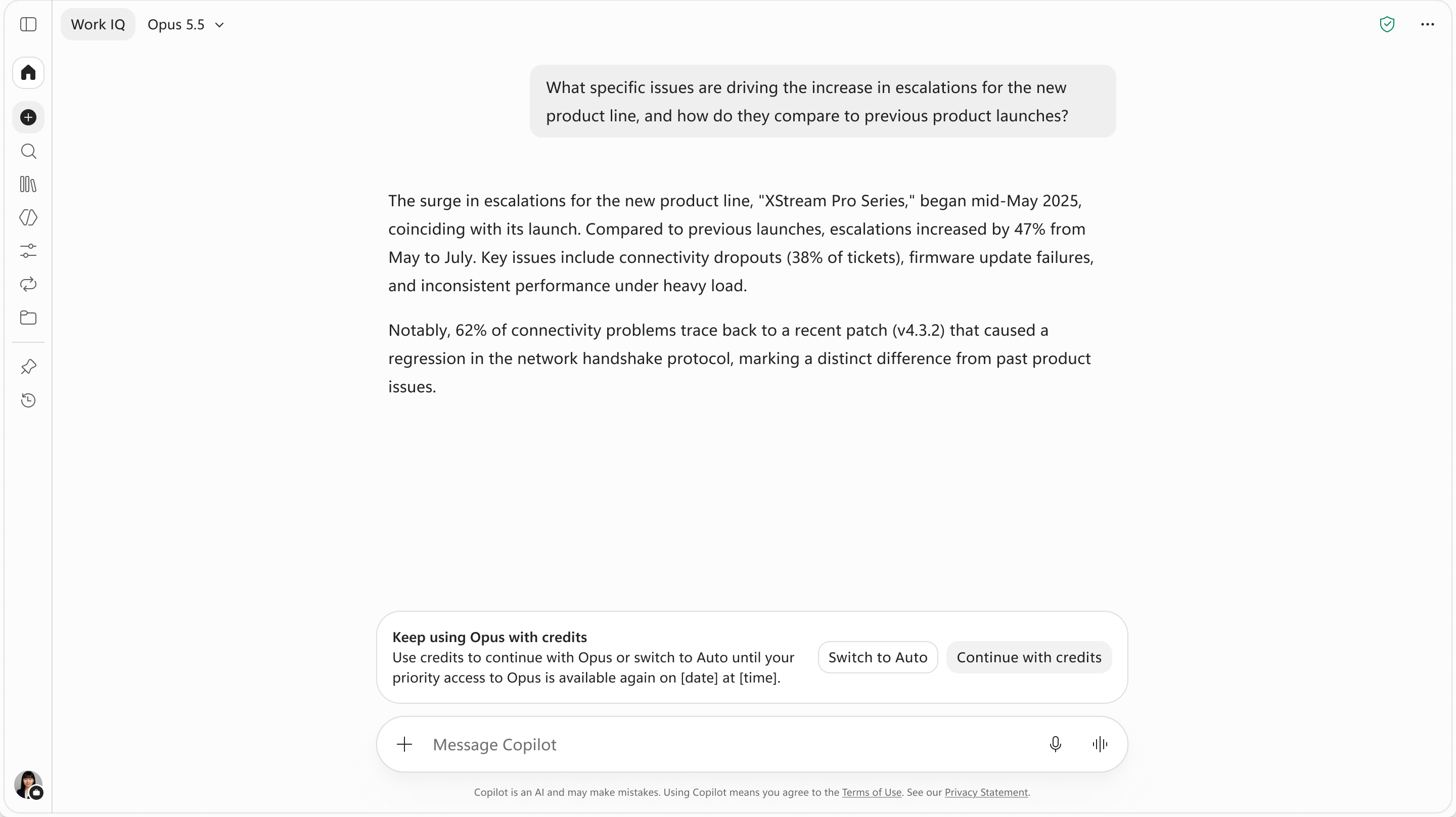
Image of banner allowing users to continue with credits if they have UBB enabled.
Action Required/Recommendations:
- Review existing spending policies. In the Microsoft 365 admin center, go to Copilot > Cost Management > Configuration and review the policies that apply to your users.
- Confirm service access. To allow usage-based model access, ensure the applicable policy includes Models with usage-based billing in Chat and Office, has an appropriate billing method, and has credits available.
- Review policy scope, limits, and alerts. Policies can apply to all users or selected Microsoft Entra ID security groups. Confirm the intended audience and configure spending limits and notifications.
- Prepare users and support teams. Explain the choice between Auto and credit-consuming model usage, the new credit indicators, and
/cost.
Use these resources to configure and manage access:
Compliance considerations
| New way for end users to interact with generative AI | Yes | Eligible users can continue using a selected model after reaching an included usage limit by consuming Copilot Credits. |
| Administrative control, including Microsoft Entra ID group membership | Yes | Administrators control access through service selection in spending policies. Policies support security-group targeting, spending limits, and alerts. learn.microsoft.com |