Microsoft 365 Message Center announcement MC1422054.
Updated August 3, 2026: We have updated the content. Thank you for your patience.
What and Why
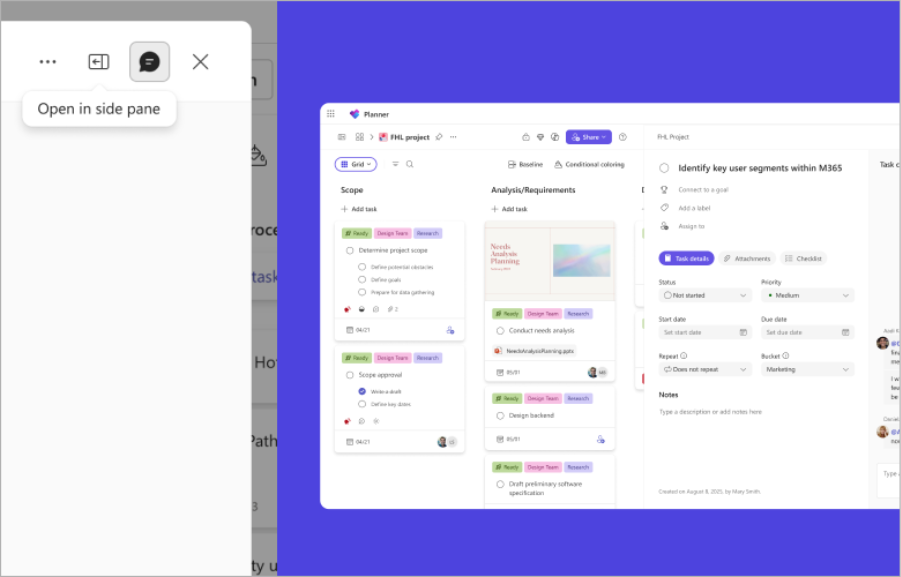
We are introducing a new task details side pane in Microsoft Planner that enables users to view and edit task details without leaving their Board, Grid, or My Tasks view. This update improves productivity by reducing context switching and allowing faster task updates.
This message is associated with Microsoft 365 Roadmap ID 566866.
Rollout Schedule
General Availability (Worldwide): Rollout begins in late July 2026; expected to complete by mid-August 2026
Impact on Your Organization
Who is affected: All users with access to Microsoft Planner
Platforms/Services:
- Planner on the web
- Planner in Microsoft Teams
What will happen:
- Users will be able to open and edit task details in a side pane while keeping their main view visible.
- Supported task fields include assignees, due dates, status, notes, checklists, and attachments.
- The system will remember each user’s preferred experience (side pane or dialog) across sessions.
- On smaller screens, the experience will automatically switch to dialog mode.
- Existing workflows remain unchanged; users can continue using the dialog experience if preferred.
- The feature will be enabled by default for all users.
Screenshot - The "Open in side pane" tooltip on a task details dialog, with the Planner Grid view visible behind it.
Action Required/Recommendations
No admin action is required.
Recommended actions:
- Inform users about the new side pane experience to reduce confusion.
- Update internal training materials and documentation if applicable.
- Prepare helpdesk teams for potential user questions about the new experience.
Compliance considerations
No compliance considerations identified, review as appropriate for your organization.